
With datamodules and non-visual component support in place, requirements that makes writing components for both NodeJS and the DOM from the same unit begins to surface. While the RTL takes care for most situations – there are spots where being able to have a $IFDEF to test against saves you some time.
Magic includes
In QTX we have a few so-called ‘magic’ include files that the IDE and compiler generates on the fly. When you start out with QTX one of the first things you notice is that forms have a {$I “intf::form”} coupled with a {$I “impl::form”}, like you see below:
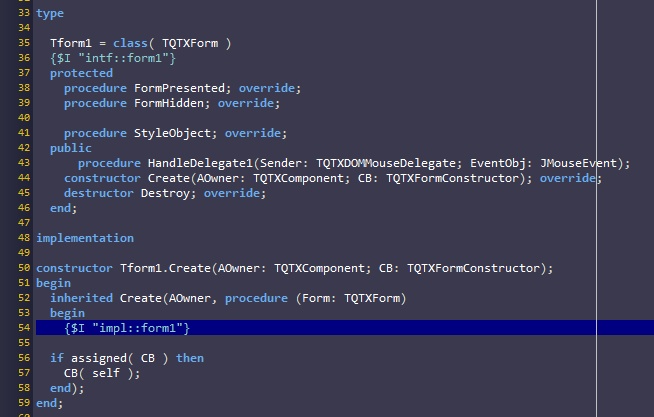
Since you are compiling for either the browser (DOM) or server (NodeJS) the idea of loading a DFM resource that contains your design is something we want to avoid. So what we do is that we convert your form design into code, and inject that into the constructor of your class.
So in the above picture the {$I “intf::form1”} will be replaced by your named widgets that you have dropped on your form — while the {$I “impl::form1”} will be replaced by the code that creates these widgets (hence its positioned inside the constructor).
Application magic
The third magic include is {$I “app::form.init”} that you can find in the app.entrypoint.pas file of your project. As you probably suspect, this is replaced by the generated code that creates your forms or datamodules.
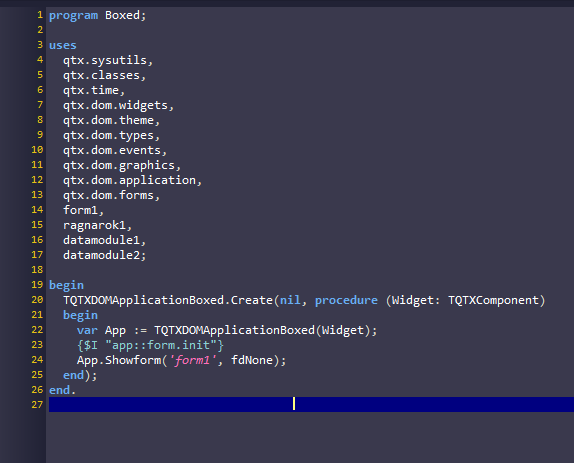
These “magic includes” solve challenges in a simple, straight forward and ad-hoc way, with as little overhead as possible.
App::config
Today we added a new token to the “APP::” magic namespace, namely “config”. As the name hints at this provides information about the current build configuration. Depending on the platform you target, the following definitions will be emitted:
- {$DEFINE PLATFORM_DOM}
- {$DEFINE PLATFORM_NODE}
- {$DEFINE PLATFORM_ANY}
And depending on the type of project, the following:
- {$DEFINE TARGET_DOM}
- {$DEFINE TARGET_NODE}
- {$DEFINE TARGET_LIBRARY}
- {$DEFINE TARGET_CLUSTER}
A normal visual project will have {$DEFINE PLATFORM_DOM} and {$DEFINE TARGET_DOM}
A library project will have {$DEFINE PLATFORM_ANY} and {$DEFINE TARGET_LIBRARY}
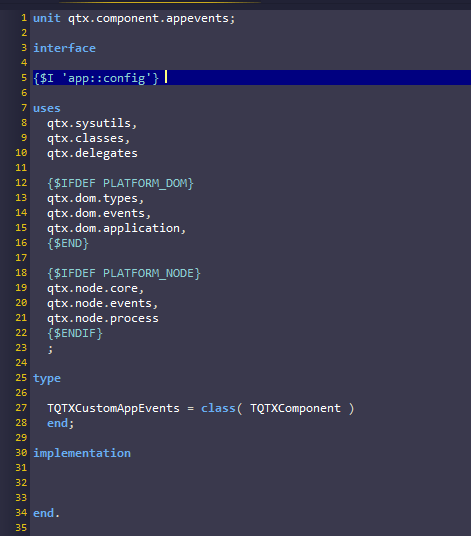
So instead of having two separate units for the same component (where that applies of course) you can now do stuff like this:
This new feature will be in the next update!