We have two new widgets in the RTL this week! Namely TQTXTable and TQTXStringGrid which does exactly what you think they do.
Being able to quickly display a structured table of information is easy in HTML, but there has been a lot of changes to the old <table> tag that we all know from older HTML. Starting with HTML5 a table is no longer just a set of rows and columns, you can also define a separate header and footer.
TQTXTable
While it was tempting to jump straight into making a database grid, we decided we had to start with the basics, namely with full encapsulation of the table tag and its sub structures. This also involves expected behavior and various options to simplify usage from a programming point of view.
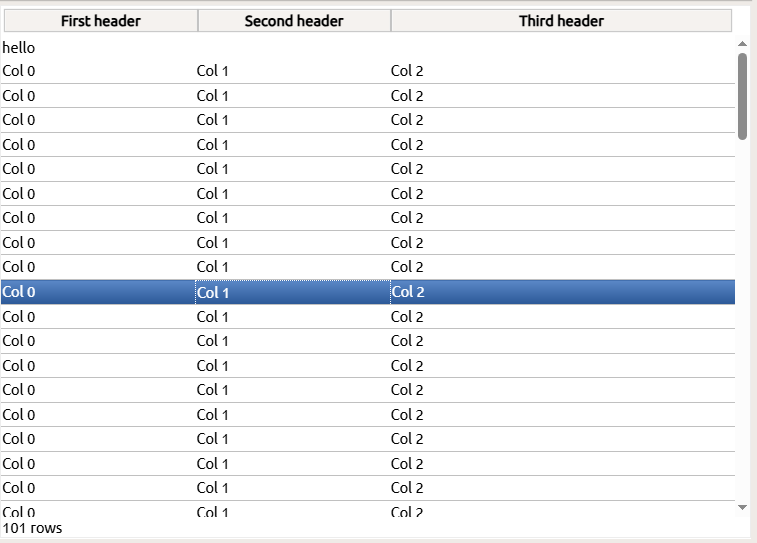
Sections
TQTXTable manages three sections which represents the header, body and footer elements. You can mix and match which of these you need, and its perfectly ok to just have a body, or a footer, or any combination of the three.
Rows and Columns
Each section can have as many rows as you like, who in turn can have any number of cells. There is no strict regime that forces your rows to have the same layout as your header by default.
Neat options
Since most use-cases will involve a header, and rows that match the layout of the header, we have exposed an option [tcFitBody] that will auto size the columns in the body section – so that it matches the layout of the header.
The same option also calculates the height of each section and makes sure the body section doesnt go beyond the <table> boundaries. If you also have the [tcScrollY] setting set, this results in the vertical scrollbar appearing.
The following options can be set:
- tcScrollY
- tcScrollX
- tcFitBody
- tcEditCells
- tcColSelect
- rcRowSelect
TQTXTable exposes ample methods that you can override to capture mouse and pointer interaction, both with cells and rows. You can also define what css style each row and cell should have by default, and which styles should be added when they are selected. This makes it easy to use your own css styles uniformly for all the rows and columns in your table.
You can also add event-handlers for row and column selection and do special colors changes or style changes if you like. All elements of the table are full TQTXWidgets so you have the full might of the RTL to throw at it, including animations if you like.
TQTXStringGrid
Inheriting from TQTXTable, TQTXStringGrid takes it one step further and adds cell editing. Here you can double-click on a cell (or double tap if you are on a tablet or phone) to enter edit mode.
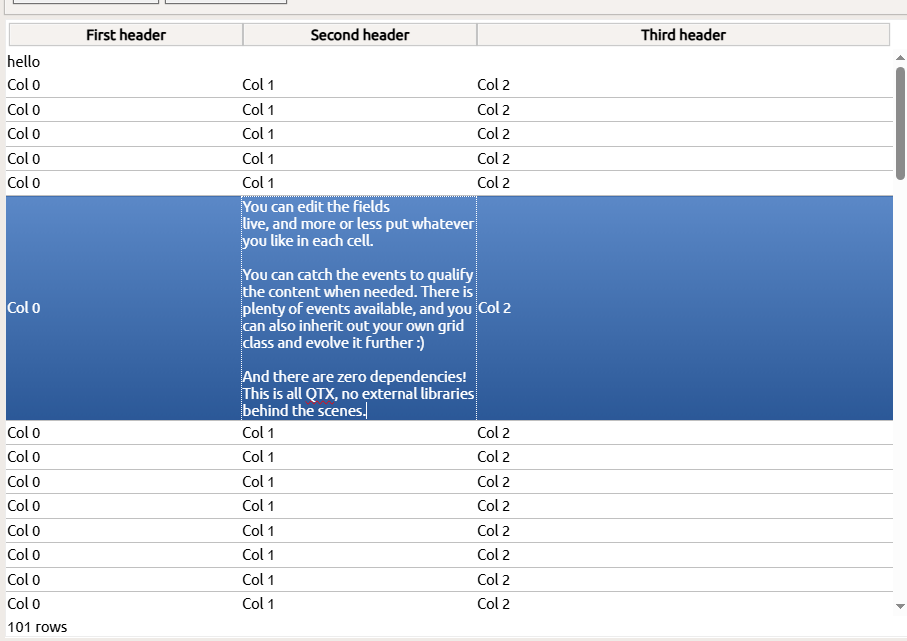
For full browsers there is also keyboard support, where pressing ESC cancel your current edit and replaces the cell content with it’s original value (standard behavior).
You can also programmatically trigger editing via EditEnter(), and also cancel any edit operation via EditEnd( cancel: boolean ).
TQTXStringGrid implements basic editing behavior which is intrinsic to the browser, but we have augmented it quite a lot. So it’s a nice way to get a fully functional StringGrid on the web.
Future grids?
We already have the methods in place that will enable database driven table browsing, but we need to get non-visual components in place first. We dont want to rush this, so we provide the non-database driven components first.
When the time comes that we have the database layer in place, we will return to this and made a proper grid that takes height for field datatype and offer different editors depending on field type.
Availability
The new components will be in the RTL package in the next update!