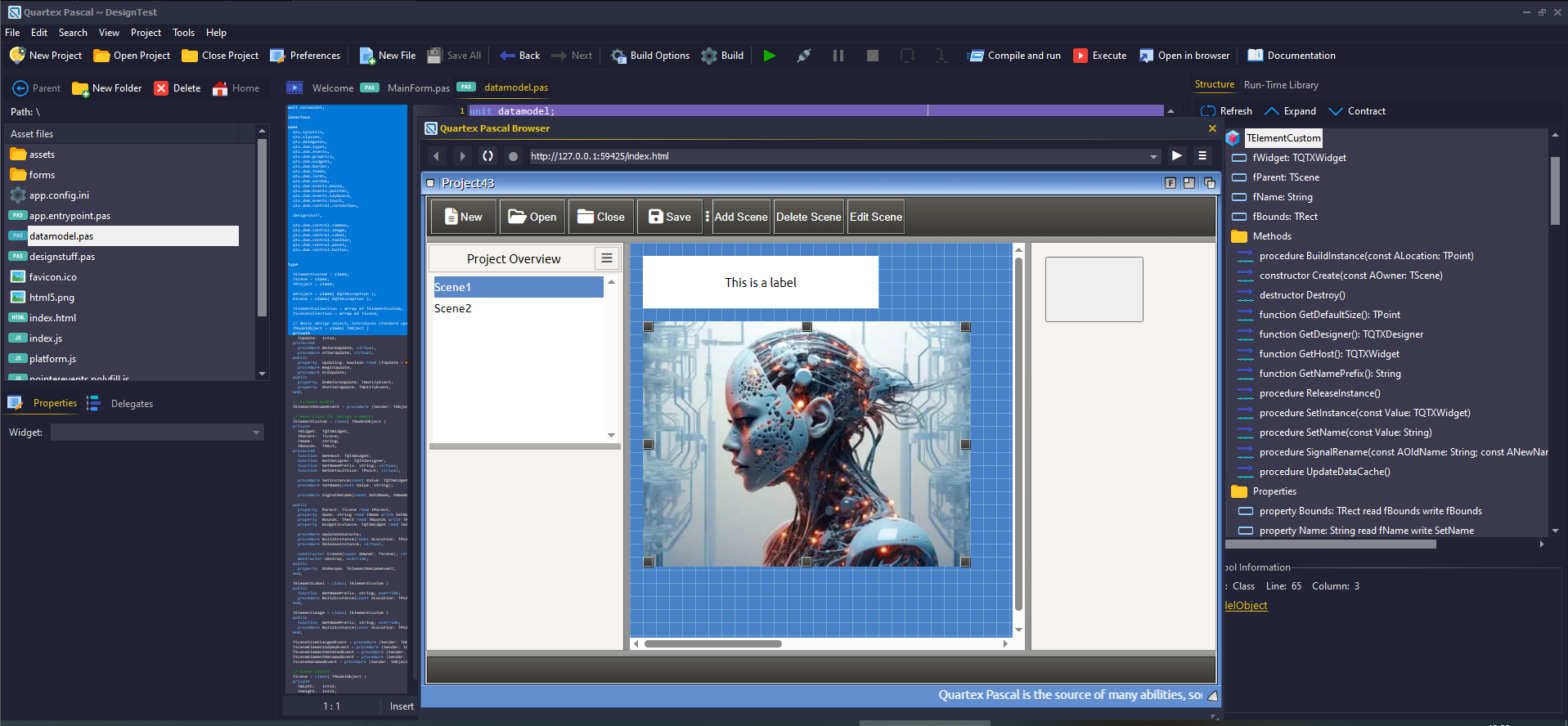

The holidays is a perfect time to enjoy some quality coding. The stress leading up to Christmas is over, and we have time to reflect, catch up on some readying, and maybe do a spot of coding just for fun!
In this article we will be creating a scrolltext widget from scratch, which is a good way to demonstrate how easy it is to write your own controls in QTX. It is a lot easier than under Delphi or Lazarus since the browser provides most of the functionality out of the box for you, and the QTX runtime library provides the rest.
So start a new visual project and add a new unit, we will be isolating our fancy new widget there.
Looking at the documentation
The DOM has an element that already does what we want, namely the marquee tag. This tag will scroll or slide text from right-to-left (e.g normal scrolltext). So our first stop is to look at the HTML documentation for that specific tag.
There are a lot of websites that maintains HTML documentation. I usually just google the tag i want to work with and read up on it first. In almost all cases W3Schools is a good place to start.
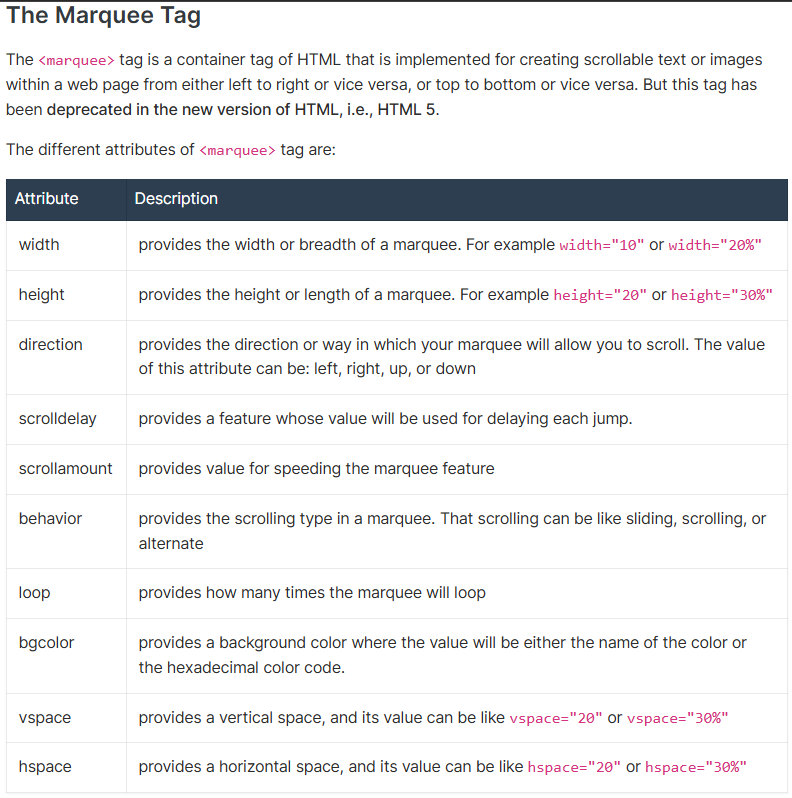
One thing worth noting when working with HTML elements, is that there are two types of properties. There are properties that you can adjust via CSS (such as width, height, border, background and similar) and then there are attributes. Attributes are usually defined via the tag itself, which is slightly different than how CSS properties are read and written to (poke around the RTL and look at the code for the other widgets is a good idea when learning the ropes!):
<marquee scrolldelay=16>
Note: Further down in the article we will be exposing attributes as pascal properties, and these are read and written somewhat different to standard html properties. This is often a case of confusion when you are just starting out, but it really is very simple. Just remember that there is a difference between HTML properties and HTML attributes and you will pick it up in no time!
Isolating enum types
Now that we have found the official HTML documentation for the element, I usually look for properties that I can turn into enums types. In the above overview two properties in particular stand out: direction and behavior. These properties are both string, which means we can use our enum as a simple index value into a pre-defined array. So let’s start by defining those!
TQTXScrollDirection = (sdNone = 0, sdLeft, sdUp, sdDown, sdRight);
TQTXScrollBehavior = (sbNone = 0, sbSliding, sbScrolling, sbAlternate);
Note: Notice that i added a “none” option at the start of each enum type. This is to allow for a state where nothing is set, and it’s also useful when we try to read properties from the live DOM at runtime. If we for some reason are unable to recognize a string from the DOM, we can fall back on sdNone or sbNone cleanly without fuzz.
To make life a little easier for ourselves (and make our code run faster) we will create two arrays that match these enum types. The idea here is, that you can use the ordinal value of the enum to get the correct string value – and likewise to lookup a string value and get the enum value. I usually refer to arrays like this as lookup tables.
Immediately beneath the implementation section, we define our lookup tables, and two helper functions to convert a string value back to an enum type. This is useful when we read values directly from the DOM at runtime.
var
sDirections: array [TQTXScrollDirection] of string = ('', 'left', 'up', 'down', 'right');

sBehavior: array[TQTXScrollBehavior] of string = ('', 'sliding', 'scrolling', 'alternate');

function StrToDirection(const Value: string): TQTXScrollDirection;
begin
  var idx := sDirections.IndexOf( Value.Trim().ToLower());
  if idx >= sDirections.Low() then
    result :=  TQTXScrollDirection(idx);
end;

function StrToBehavior(const Value: string): TQTXScrollBehavior;
begin
  var idx := sBehavior.IndexOf( Value.Trim().ToLower());
  if idx >= sBehavior.Low() then
    result :=  TQTXScrollBehavior(idx);
end;
Next, we need to define our own widget class. By default all TQTXWidget’s will create a DIV element, so the first thing we need to do is to change that. We want our widget to create a marquee element instead.
TQTXScrollText = class( TQTXWidget )
protected
  function CreateElementInstance: TWidgetHandle; override;
end;
And further down in our implementation section of the unit we add the code for our new CreateElementInstance() method as such:
function TQTXScrolltext.CreateElementInstance: THandle;
begin
  asm
    @result = document.createElement("marquee");
  end;
end;
Getter and setter logic
Values that you have applied to a visual control in QTX during design time (in the form designer or inspector) are always written to the widget as a part of the constructor callback (you can read about that in the documentation). This means that we need to cache values if the widget is not in “ready state”. This is more or less the exact same as you would do in Delphi.
At this point I want to include a couple of the other properties for the HTML element (delay and amount) which map more cleanly to integer values (no need for any lookup tables there).
Our class now looks like this:
  TQTXScrollText = class( TQTXWidget )
  private
    fDirection: TQTXScrollDirection;
    fBehavior: TQTXScrollBehavior;
    fDelay:     int32;
    fAmount:    int32;
  protected
    function    GetDelay: int32; virtual;
    procedure   SetDelay(const Value: int32); virtual;

    function    GetAmount: int32; virtual;
    procedure   SetAmount(const Value: int32); virtual;

    function    GetDirection: TQTXScrollDirection; virtual;
    procedure   SetDirection(const value: TQTXScrollDirection); virtual;

    function    GetBehavior: TQTXScrollBehavior; virtual;
    procedure   SetBehavior(const value: TQTXScrollBehavior); virtual;

    function    CreateElementInstance: TWidgetHandle; override;

  public
    property  GetAmount: int32 read GetAmount write SetAmount;
    property  Delay: int32 read GetDelay write SetDelay;
    property  Direction: TQTXScrollDirection read GetDirection write SetDirection;
    property  Behavior: TQTXScrollBehavior read GetBehavior write SetBehavior;
  end;
With the definition in place, let’s get to the boring task of implementing the getter and setter methods!
function TQTXScrollText.GetDirection: TQTXScrollDirection;
begin
  if WidgetState = wsReady then
    result := StrToDirection( TQTXBrowser.ReadComputedStr(Handle, "direction") )
  else
    result := fDirection;
end;

procedure TQTXScrollText.SetDirection(const Value: TQTXScrollDirection);
begin
  if WidgetState = wsReady then
    Handle.direction :=  sDirections[ value ]
  else
    fDirection := value;
end;

function TQTXScrollText.GetBehavior: TQTXScrollBehavior;
begin
  if WidgetState = wsReady then
    result := StrToBehavior( TQTXBrowser.ReadComputedStr(Handle, "behavior") )
  else
    result := fBehavior;
end;

procedure TQTXScrollText.SetBehavior(const value: TQTXScrollBehavior);
begin
  if WidgetState = wsReady then
    Handle.behavior :=  sBehavior[ value ]
  else
    fBehavior := value;
end;

function TQTXScrollText.GetAmount: int32;
begin
  if WidgetState = wsReady then
    result := Attributes.AttributeRead("scrollamount")
  else
    result := fAmount;
end;

procedure TQTXScrollText.SetAmount(const Value: int32);
begin
  if WidgetState = wsReady then
    Attributes.AttributeWrite('scrollamount', value)
  else
    fAmount := value;
end;

function TQTXScrollText.GetDelay: int32;
begin
  if WidgetState = wsReady then
    result := Attributes.AttributeRead("scrolldelay")
  else
    result := fDelay;
end;

procedure TQTXScrollText.SetDelay(const Value: int32);
begin
  if WidgetState = wsReady then
    Attributes.AttributeWrite('scrolldelay', value)
  else
    fDelay := value;
end;
Scaffolding and stuff
You are probably wondering why there is no property for the, well, actual text that we will be scrolling? Well that is the fun part! The marquee element will scroll whatever text you have defined as it’s innerHTML property. And that property is already defined and published in TQTXWidget that we inherit from, so you dont really need to do anything for that.
While we do want a bit more code added, like our own constructor, and override the ApplyPropertyCache() method — lets just give it a spin first and see what we have so far!
Flip over to the tab for your mainform and add the following code to your constructor:
var lScroller := TQTXScrollText.Create( panel3, nil );
lScroller.Height := 32;
lScroller.Amount := 4;
lScroller.Behavior := TQTXScrollBehavior.sbScrolling;
lScroller.align := alBottom;
lScroller.InnerHtml := "<b>Welcome</b> to the fun and games of HTML controls!";
lScroller.ThemeBackground := TThemeBackground.bgDecorativeInverted;
lScroller.Font.Color := clWhite;
I added the blue gradient theme background purely so we can see the widget’s boundaries. As you can see below, it aligns neatly to the bottom of the form (I only took a small screengrab here, no point posting a large empty form).

Congratulations! You have now created your first visual QTX control! The next step is to do the typical organization for widgets that can be used by the form designer:
- Rename the class to TQTXCustomScrolltext
- Expose the HSpacing and VSpacing attrbutes
- Define another class called TQTXScrolltext which defines the properties as published with default values. This allows you to inherit new widgets from TQTXCustomScrolltext and chose what properties you want to expose.
- Override ApplyPropertyCache() which ensures that values set in the inspector is properly written to the underlying marquee element immediately after it reaches it’s ready-state.
- Define a custom constructor for TQTXScrolltext, which the IDE needs to generate code that targets the widget specifically.
- Add delegate definitions so standard delegate types can be added from the form designer
Here is the finished unit, ready for use. If you create a folder for it and add a filesource for that folder (see preferences window) the IDE will notice the attributes for the class and register it on your widget palette!
unit qtx.dom.control.scrolltext;

interface

uses
  qtx.sysutils,
  qtx.classes,
  qtx.dom.types,
  qtx.delegates,
  qtx.dom.events,
  qtx.dom.theme,
  qtx.dom.events.mouse,
  qtx.dom.events.pointer,
  qtx.dom.events.keyboard,
  qtx.dom.events.touch,
  qtx.dom.widgets;

type
  // Forward declarations
  TQTXCustomScrolltext = class;
  TQTXScrolltext = class;

  // Enum types
  TQTXScrollDirection = (sdNone = 0, sdLeft, sdUp, sdDown, sdRight);
  TQTXScrollBehavior = (sbNone = 0, sbSliding, sbScrolling, sbAlternate);

  // Base class that implements the Marquee element
  TQTXCustomScrolltext = class( TQTXWidget )
  private
    fDirection: TQTXScrollDirection;
    fBehavior: TQTXScrollBehavior;
    fDelay:     int32;
    fAmount:    int32;
    fHSpace:    int32;
    fVSpace:    int32;
  protected
    function    GetDelay: int32; virtual;
    procedure   SetDelay(const Value: int32); virtual;

    function    GetAmount: int32; virtual;
    procedure   SetAmount(const Value: int32); virtual;

    function    GetDirection: TQTXScrollDirection; virtual;
    procedure   SetDirection(const value: TQTXScrollDirection); virtual;

    function    GetBehavior: TQTXScrollBehavior; virtual;
    procedure   SetBehavior(const value: TQTXScrollBehavior); virtual;

    function    GetHSpace: int32;
    procedure   SetHSpace(const Value: int32);

    function    GetVSpace: int32;
    procedure   SetVSpace(const Value: int32);

    function    CreateElementInstance: TWidgetHandle; override;

    procedure   ApplyPropertyCache; override;
  end;

  // Custom constructor
  TQTXScrolltextConstructor = procedure (ScrollText: TQTXScrolltext);

  [PropertyDialog('InnerHtml', dlgHTML)]
  [PropertyDialog('InnerText', dlgTEXT)]
  [PropertyDialog('Value', dlgTEXT)]
  [RegisterInfo('Standard HTML5 Marquee scrolltext', 'qtx_ui_button.png')]
  [RegisterWidget(pidBrowser, ccGeneral)]
  [DefaultName('Scroller')]
  [BindDelegates([
    TQTXDOMMouseWheelDelegate,
    TQTXDOMMouseClickDelegate,
    TQTXDOMMouseDblClickDelegate,
    TQTXDOMMouseEnterDelegate,
    TQTXDOMMouseLeaveDelegate,
    TQTXDOMMouseDownDelegate,
    TQTXDOMMouseMoveDelegate,
    TQTXDOMMouseUpDelegate,
    TQTXDOMPointerLostCaptureDelegate,
    TQTXDOMPointerGotCaptureDelegate,
    TQTXDOMPointerUpDelegate,
    TQTXDOMPointerMoveDelegate,
    TQTXDOMPointerDownDelegate,
    TQTXDOMPointerLeaveDelegate,
    TQTXDOMPointerEnterDelegate,
    TQTXDOMKeyboardPressDelegate,
    TQTXDOMKeyboardUpDelegate,
    TQTXDOMKeyboardDownDelegate,
    TQTXDOMTouchStartDelegate,
    TQTXDOMTouchEndDelegate,
    TQTXDOMTouchMoveDelegate,
    TQTXDOMTouchCancelDelegate
    ])]
  TQTXScrolltext = class( TQTXCustomScrolltext )
  public
    constructor Create(AOwner: TQTXComponent; CB: TQTXScrolltextConstructor); reintroduce; virtual;
  published
    property  Amount: int32 read GetAmount write SetAmount default 1;
    property  Delay: int32 read GetDelay write SetDelay default 1;
    property  Direction: TQTXScrollDirection read GetDirection write SetDirection default sdLeft;
    property  Behavior: TQTXScrollBehavior read GetBehavior write SetBehavior default sbScrolling;
    property  HSpace: int32 read GetHSpace write SetHSpace default 0;
    property  VSpace: int32 read GetVSpace write SetVSpace default 0;
  end;


// Expose helper functions so anyone inheriting from TQTXCustomScrolltext
// can easily map values without having to expose the lookup tables
function StrToDirection(const Value: string): TQTXScrollDirection;
function StrToBehavior(const Value: string): TQTXScrollBehavior;

implementation

var
  sDirections: array [TQTXScrollDirection] of string = ('', 'left', 'up', 'down', 'right');
  sBehavior: array[TQTXScrollBehavior] of string = ('', 'sliding', 'scrolling', 'alternate');

function StrToDirection(const Value: string): TQTXScrollDirection;
begin
  var idx := sDirections.IndexOf( Value.Trim().ToLower() );
  if idx >= sDirections.Low() then
    result :=  TQTXScrollDirection(idx);
end;

function StrToBehavior(const Value: string): TQTXScrollBehavior;
begin
  var idx := sBehavior.IndexOf( Value.Trim().ToLower() );
  if idx >= sBehavior.Low() then
    result :=  TQTXScrollBehavior(idx);
end;

//#############################################################################
// TQTXScrolltext
//#############################################################################

constructor TQTXScrolltext.Create(AOwner: TQTXComponent; CB: TQTXScrolltextConstructor);
begin
  inherited Create(AOwner, procedure (Widget: TQTXWidget)
  begin
    // This serves two purposes. We init the default values when creating
    // the widget by code (not on a form design), and we endure that the
    // HTML attrbutes are initialized before we read from them
    Amount := 1;
    Delay := 1;
    Direction := sdLeft;
    behavior := sbScrolling;
    HSpace := 0;
    VSpace := 0;

    if assigned( CB ) then
      CB( self );
  end);
end;

//#############################################################################
// TQTXCustomScrolltext
//#############################################################################

function TQTXCustomScrolltext.CreateElementInstance: THandle;
begin
  asm
    @result = document.createElement("marquee");
  end;
end;

procedure TQTXCustomScrolltext.ApplyPropertyCache;
begin
  inherited;
  SetAmount( fAmount );
  SetDelay( fDelay );
  SetDirection( fDirection );
  SetBehavior( fBehavior );
  SetHSpace( fHSpace );
  SetVSpace( FVSpace );
end;

function TQTXCustomScrolltext.GetDirection: TQTXScrollDirection;
begin
  if WidgetState = wsReady then
    result := StrToDirection( TQTXBrowser.ReadComputedStr(Handle, "direction") )
  else
    result := fDirection;
end;

procedure TQTXCustomScrolltext.SetDirection(const Value: TQTXScrollDirection);
begin
  if WidgetState = wsReady then
    Handle.direction :=  sDirections[ value ]
  else
    fDirection := value;
end;

function TQTXCustomScrolltext.GetBehavior: TQTXScrollBehavior;
begin
  if WidgetState = wsReady then
    result := StrToBehavior( TQTXBrowser.ReadComputedStr(Handle, "behavior") )
  else
    result := fBehavior;
end;

procedure TQTXCustomScrolltext.SetBehavior(const value: TQTXScrollBehavior);
begin
  if WidgetState = wsReady then
    Handle.behavior :=  sBehavior[ value ]
  else
    fBehavior := value;
end;


function TQTXCustomScrolltext.GetHSpace: int32;
begin
  if WidgetState = wsReady then
    result := Attributes.AttributeRead("hspace")
  else
    result := fHSpace;
end;

procedure TQTXCustomScrolltext.SetHSpace(const Value: int32);
begin
  if WidgetState = wsReady then
    AttributeWrite('hspace', value)
  else
    fHSpace := value;
end;

function TQTXCustomScrolltext.GetVSpace: int32;
begin
  if WidgetState = wsReady then
    result := Attributes.AttributeRead("vspace")
  else
    result := fVSpace;
end;

procedure TQTXCustomScrolltext.SetVSpace(const Value: int32);
begin
  if WidgetState = wsReady then
    AttributeWrite('vspace', value)
  else
    fVSpace := value;
end;

function TQTXCustomScrolltext.GetAmount: int32;
begin
  if WidgetState = wsReady then
    result := Attributes.AttributeRead("scrollamount")
  else
    result := fAmount;
end;

procedure TQTXCustomScrolltext.SetAmount(const Value: int32);
begin
  if WidgetState = wsReady then
    AttributeWrite('scrollamount', value)
  else
    fAmount := value;
end;

function TQTXCustomScrolltext.GetDelay: int32;
begin
  if WidgetState = wsReady then
    result := Attributes.AttributeRead("scrolldelay")
  else
    result := fDelay;
end;

procedure TQTXCustomScrolltext.SetDelay(const Value: int32);
begin
  if WidgetState = wsReady then
    AttributeWrite('scrolldelay', value)
  else
    fDelay := value;
end;

end.